 ™
™Whiteboard or share screen?
The Befundo team · September 20, 2026 · 4 min read
A teacher running a live class on Befundo has two ways to put something in front of everybody: the Whiteboard button and the Share screen button. They look like two routes to the same place. They aren't, and picking the wrong one makes the lesson harder to follow.
The quick answer
- Drawing or writing live? Press Whiteboard. Every student sees it at once, sharp on any screen.
- Showing slides, a website, a document or a different drawing app? Use Share screen.
- Don't share your screen to show the whiteboard. The share covers the board, and sharing the Befundo tab shows the class a picture of the room they're already in.

The whiteboard goes to everybody
Press Whiteboard and it goes on every screen in the class at the same moment. You don't need to ask anyone to open anything. Press Video and it comes off again, and everybody is back to the faces.
What travels is the drawing itself, not a video of it. Every line and every word you write is sent as drawing data and redrawn on each device. That's why it stays sharp on a phone: there is no picture being squeezed down to fit, and small handwriting doesn't turn to mush.
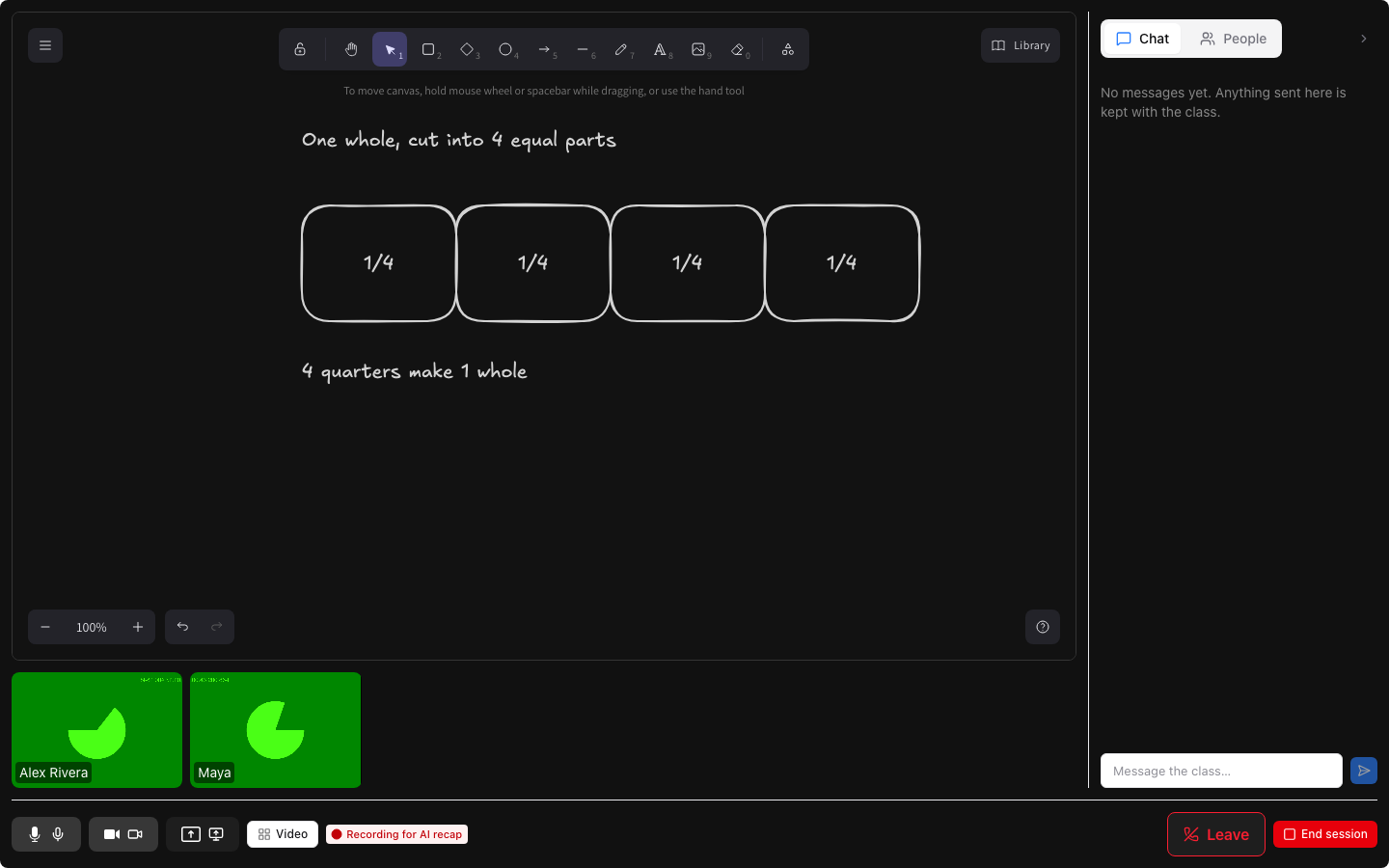
While the board is up, the video tiles move into a strip underneath it, so you can still see the class while you draw.
Only the teacher draws
The board belongs to whoever is teaching. Students and families watch it, and they have no whiteboard button of their own. That's deliberate. If everybody could decide whether to look at the board or at the faces, you would never know what anybody was looking at. This way the room shows what the teacher is showing, the same way a screen share does.
On a computer you get the whole toolbox: shapes, text, arrows, lines and images. A teacher on an iPad can draw on the board in the Befundo iPad app, freehand in six colors, and every device shows that back exactly. Families watching in the phone app see a plainer version of what a computer draws, with anything it can't draw named rather than silently missing.
Why sharing your screen gets in the way
It's tempting to share your screen so that everybody "definitely" sees the board. It has the opposite effect.
A shared screen takes over the middle of the room for as long as it lasts. The board is still there, but it goes underneath the share and stays hidden until you stop sharing. If the tab you share is the Befundo room itself, the class gets a blurry video of the room they are already sitting in. The drawing that was sharp on their screen a moment ago is now a picture of a picture.
So if the thing you want to show is the board, just press Whiteboard. It is already on everybody's screen.
When Share screen is the right button
Share screen is the button with a screen and an arrow on it, and it is for everything that isn't the board:
- slides you've already made
- a website or a video you want to talk through
- a document or worksheet
- a different drawing app you prefer to use
Only staff can share a screen. A student or family never sees the button, because a screen is whatever happens to be on it, notifications included, and that is a teacher's call to make. Families watch a share the same way they watch the board, on any device. When you stop sharing, the room goes back to what it was showing before, board included, with nothing lost.
What happens to the board afterwards
Nothing about the board outlives the class.
- It survives a reload. If you close the tab by accident and come back, the board is where you left it, give or take the last few seconds.
- It ends with the class. When you end the session, the board goes too, and it doesn't appear on any page afterwards.
- Clear wipes it for everybody. There's no undo and no copy kept, so be sure before you press it.
If a diagram is worth keeping, save a picture of it before you finish the class. The board is kept only for the length of the lesson, and no audio or video of the class is kept either.
In short
Draw on the whiteboard. Share your screen for everything else. And if you ever catch yourself sharing the Befundo tab, stop the share: the board is already there.